
Everything You Need to Know About Blinkit Seller Onboarding Process
Blinkit Seller Onboarding Process
BlinkIt (formerly known as Grofers) is among the top quick-commerce platforms throughout Asia, allowing sellers to provide customers with products in under 15 minutes. Becoming a BlinkIt seller provides brands and retailers plenty of exposure and frequent orders; however, one of the more common inquiries sellers ask is:
“How long does it take to go through the BlinkIt seller onboarding process?”
This guide covers exactly how long seller onboarding takes from start to finish, how to expedite the approval process, the many challenges that cause delays, and what sellers can do to help ensure they are approved faster than average.
What Is BlinkIt Seller Onboarding?
As a BlinkIt Seller, you will have the ability to sell products on the BlinkIt marketplace. The onboarding process entails registering your business, verifying your paperwork, uploading products, and receiving the proper amount of approval to sell through BlinkIt. Sellers must go through the onboarding process to have products listed on BlinkIt and to begin receiving orders.
Only after successful onboarding can sellers:
-
List products on Blinkit
-
Receive and fulfill orders
-
Manage inventory and pricing
-
Track payments and settlements

What does the onboarding process provide to sellers?
* Ensures that the business is compliant with local laws
* Provides sellers with product quality control
* Provides sellers with accurate pricing and inventory
* Provides sellers with a seamless logistics integration with BlinkIt
Overall Duration To Become A BlinkIt Seller
General process time from application start to complete: 20-22 Business Days!
Most applications will be submitted within 5 – 7 Business Days; however complex sellers may take up to 2 to 3 weeks for processing depending on seller documentation, product category, and the seller’s responsiveness.
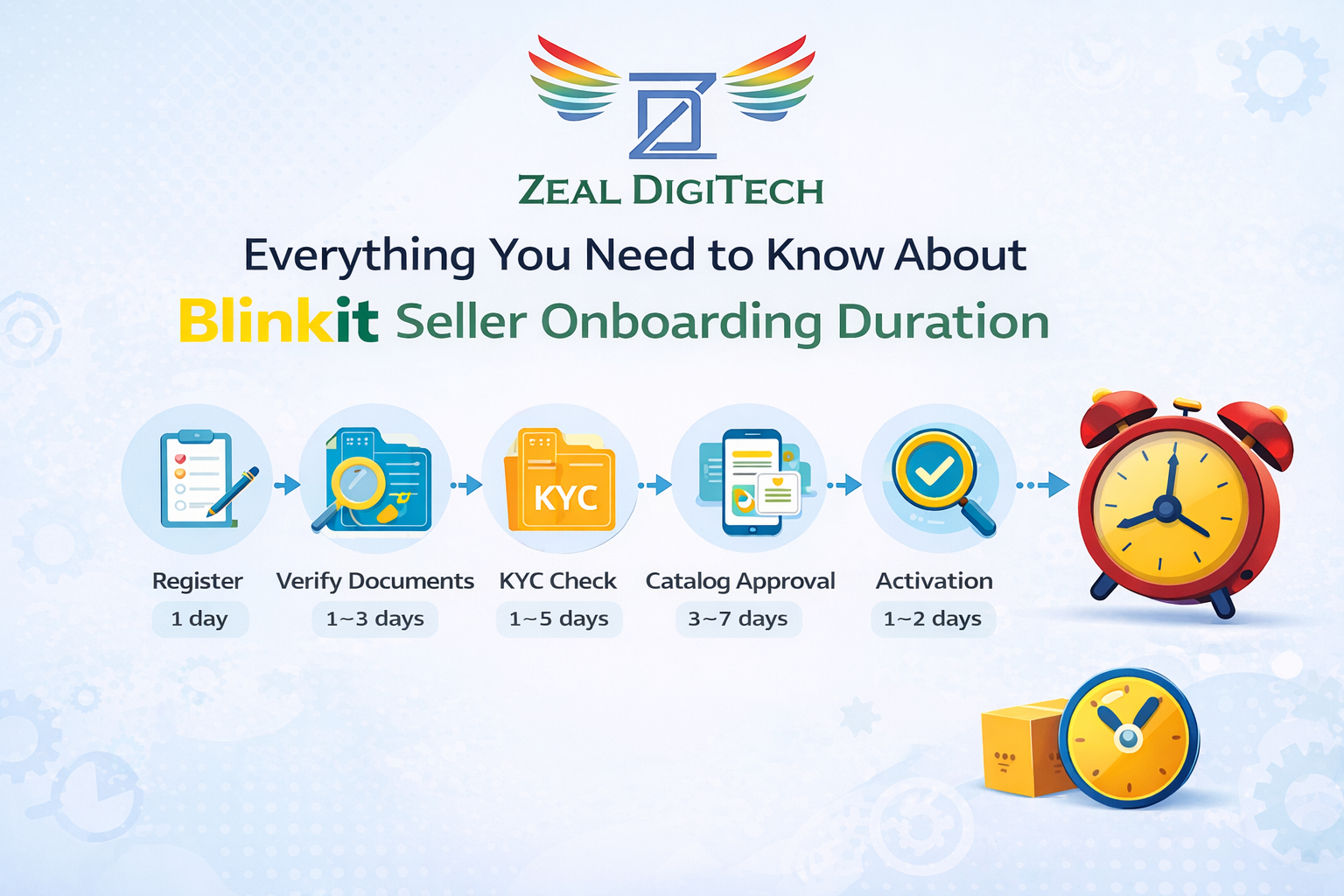
Detailed Breakdown of the Duration of BlinkIt Seller Onboarding
1. Apply and Register
General Processing Time: Same Day
To begin the onboarding process, all of the following must be completed:
* Business Name
* Contact Information
* Business type (proprietorship, partnership, company)
* Product category

2. SUBMITTING DOCUMENTS AND BEING APPROVED
TIME FRAME: 1-3 BUSINESS DAYS
Blinkit will verify your business protects its own identity by verifying that you legally operate as a business.
DOCUMENTS REQUIRED:
– GST Certificate
– PAN Card
– Bank Account Information (Cancelled Cheque/Passbook)
– Proof of Address
– ID of the Owner/Director
THE IMPORTANCE OF THIS STEP:
Because Blinkit only allows verified businesses to sell products we are confident in the legitimacy of the sellers.
REASONS FOR DELAY:
– Blurry or unclear copies of required documents
– A name on GST and PAN does not match
– Bank information has expired or is incorrect
3. KYC AND COMPLIANCE CHECK
TIME FRAME:1-5 BUSINESS DAYS
Compliance checks are used by Blinkit to verify the following:
– Whether or not your business is authentic
– If you are legally able to sell your product
– Category specific compliance (depending on what you are selling)
Certain categories of products (i.e., food, cosmetics, health) may require you to obtain **CERTIFICATE(S)** including:
– FSSAI License
– Ingredient List for Product
– Proof of Products Manufacturing or Sourcing
4. CATALOG UPLOAD AND APPROVAL
TIME FRAME: 3-7 BUSINESS DAYS
This will be the **LONGEST** stages of the onboarding process.
You must upload:
– Product Images (High Quality)
– Accurate Titles and Descriptions of the Products
– Price and MRP of the Products
– SKU and Bar Code Information for Each Item
– Catalog Map to the Relevant Product Categories
CATALOG APPROVAL TAKES TIME BECAUSE:
– The Product Images are checked for quality
– The Product Images must comply with Blinkit’s Listing Policies
– Prices must be validated
If you have poor quality images or incomplete catalog information it can result in your products being rejected, requiring you to resubmit for approval again and add to your onboarding time line.
5. SIGNING AND DELIVERING COMMERCIAL AGREEMENT AND SETTING UP SELLER ACCOUNT.
TIME FRAME: 1-2 BUSINESS DAYS
Once your documents and catalog are approved:
– The Seller Agreement is finalized.
– The commission structure is finalized.
* Payment Cycle Details Are Set
You have now officially been given permission to sell on Blinkit.
6. Account Activation
Time to Perform: 1-2 Business Days
Activating your account on Blinkit allows you to:
* Receive orders
* Manage inventory
* Track payments
* Monitor Performance
You’re now live on Blinkit!
Total Blinkit Seller Onboarding Duration :
Stage of Seller Onboarding ( Estimated Time )
1. Registration :- Same Day
2. Document Verification :- 1-3 Days
3.KYC/Compliance :- 1-5 Days
4. Catalog Approval :- 3-7 Days
5. Agreement / Activation :- 1-2 Days
6. Total Time :- 20- 22 Business Days
Factors Affecting The Customer Service Agent Onboarding Duration
The time an agent will take to complete onboarding as a customer service agent is not a fixed time frame. While most agents are generally able to complete onboarding in 20 – 22 business days, the actual amount of time will vary based upon several critical factors that can be identified so that the agent can avoid delays and complete onboarding in the shortest amount of time possible.
1. Document Accuracy and Completeness
If an agent submits any of the mandatory documents (i.e. GST certificate, PAN card, bank details, address proof, etc.) required for onboarding are missing, unclear, or have conflicting information, Blinkit will require the agent to resubmit them, which will cause a delay in the completion of the onboarding process.
– Correct & complete documents → Faster Section Approval
– Errors or missing details → Several Days Delay
2. Product Category & Compliance Requirements
The time it takes to get approval also varies depending upon the product category that the agent will be selling. Some categories generally receive faster approval:
– Fast Moving Consumer Goods & Daily Necessities → Generally receive faster approval
– Food, Cosmetics, Health Products, & Personal Care Items → May require additional certifications (ex. FSSAI, Ingredient Disclosure, Manufacturing Process, etc.) prior to receiving approval.
3. Product Catalog Quality
Catalog approval is one of the longest time requirements to complete onboarding as a customer service agent. Retrieving a catalog with minimum items (a maximum of the number of items in a category to begin) will take the least amount of time.
Importance of Seller Onboarding:
The onboarding process for sellers is the backbone to any marketplace like Blinkit. If the onboarding process is smooth and structured, it allows sellers to start selling quickly, while also keeping the quality of the platform in line to customer trust.
1) Quality & Compliance
When sellers are properly onboarded, they go through a verification process that verifies their identity, legitimacy and authenticity of what they sell. This serves to protect the platform from:
i)Fraud and/or fake sellers
ii)GST, KYC and other legal compliance
iii)Maintaining a high standard of products and services offered through the platform.
2) Quick Time-to-Market for Sellers
With a well-organized onboarding process, sellers can:
i)Go live quickly with approved catalog
ii)Generate revenue sooner
iii)Avoid unnecessary delays due to documentation mistakes
iv)Quick time-to-market is especially true for quick-commerce type models like Blinkit, where time is of the essence.
3) Builds Trust with Customers
The overall level of trust between customers and marketplaces with verified sellers drives customer decisions to purchase from both the marketplace and individual seller. When onboarding is effective, it:
i)Provides accurate product listings
ii)Decreases order cancellations or complaints
4) Less Operational Issues
When sellers are properly onboarded, there are fewer:
i)Pricing or inventory discrepancies
ii)Shipping and fulfillment mistakes
As a result, it makes day-to-day operations on both sides – the seller and the marketplace – run much smoother.
5. Collect Positive Customer Ratings & Reviews
Good customer feedback shows producers’ quality to their algorithms:
i)Deliver exactly what you have listed
ii)Emphasize on good packaging that is secure and clean
6. Reduce Product Returns & Customer Complaints
i)Returns will hurt your ranking as well as your profit.
ii)Make sure you use a true image and description of the product.
iii)Make sure you do not have misleading claims.
Tips for Performance and Rankings
Strong performance and high ranking in places like Blinkit depend on data, consistency and smart optimization; these practical tips will help sellers improve visibility, conversions and revenue growth over time.
1. Optimize Product Listings Fully
When listings are optimized well, they rank higher and convert more quickly.
i)Use clear, keyword-rich product titles
ii)Add accurate product descriptions with information about size, quantity and how to use products
iii)Upload quality product images with a clean white background
iv) Choose the correct category for the product you’re selling
v) Platforms favours complete listings when determining ranking order.
2. Maintain Accurate Inventory Level
The accuracy of your inventory level will impact your ranking.
i)If you experience frequent stockouts, your sales velocity will suffer and consequently your ranking will drop.
ii)Accurate inventory level and site status, will boost visibility and credibility.
3. Focus on Fast Fulfilment & SLA Compliance
Quick commerce operates on speed and responsiveness.
i)Fulfil orders quickly
ii) Conform to Blinkit’s expectations for packaging and delivery
iii)Minimize order cancellations
iv)Consistency meeting SLA performance targets will build seller reliability ratings.
4. Price Products Competitively
Pricing of your products has a direct impact on rank and sales velocity.
i) Monitor competitor pricing
ii)“Value-based” pricing versus “undercutting” your competition is a superior strategy.
iii) Use combination offers to increase average order value (AOV) from your listings.
iv)Competitive pricing will create higher CTRs and conversion rates.
5. Improve Customer Ratings & Reviews
i)Positive feedback signals quality to the algorithm.
ii)Deliver exactly what’s listed
iii)Focus on secure, clean packaging
6. Reduce Returns & Complaints
i)Returns hurt both rankings and profitability.
ii)Use accurate images and descriptions
iii)Avoid misleading claims
7. Use Promotions Strategically
i)Promotions increase visibility and sales momentum.
ii)Participate in Blinkit campaigns
iii)Offer limited-time discounts
iv)Highlight fast-moving SKUs
v)Sales velocity during promotions helps improve organic rankings later.
Zeal Digitech offers comprehensive Blinkit seller support via:
✅ Guidance with seller registration
✅ Support with Documents and KYC verification
✅ Optimization of product catalogue
✅ Image compliance and catalogue compliance checks
✅ Performance optimization and ranking optimization strategies (for example, improving seller position on Blinkit seller pages)
We support sellers in going live as quickly as possible, and avoiding rejections so that they can profitably start/win/sell these products.
Conclusion:
The Blinkit seller onboarding process is a clear and timely operation. By preparing correctly and getting expert support from our business, your onboarding process will be smooth so that you can start making money without any delay.
Starting strong is important for the continued success of your business; thus, using Blinkit to achieve growth through an exciting on-boarding process serves as the stepping-stone for your long-term success.
🚀 Work with Zeal Digitech to help you simplify your Blinkit onboarding process and achieve successful quick commerce.